


Most clubs don't switch off spreadsheets because they love the pain. They stay because the migration itself feels terrifying. One wrong export, one botched import, and suddenly nobody knows who paid dues this year, who's a lifetime member, and who quit in 2019 but keeps getting renewal emails.
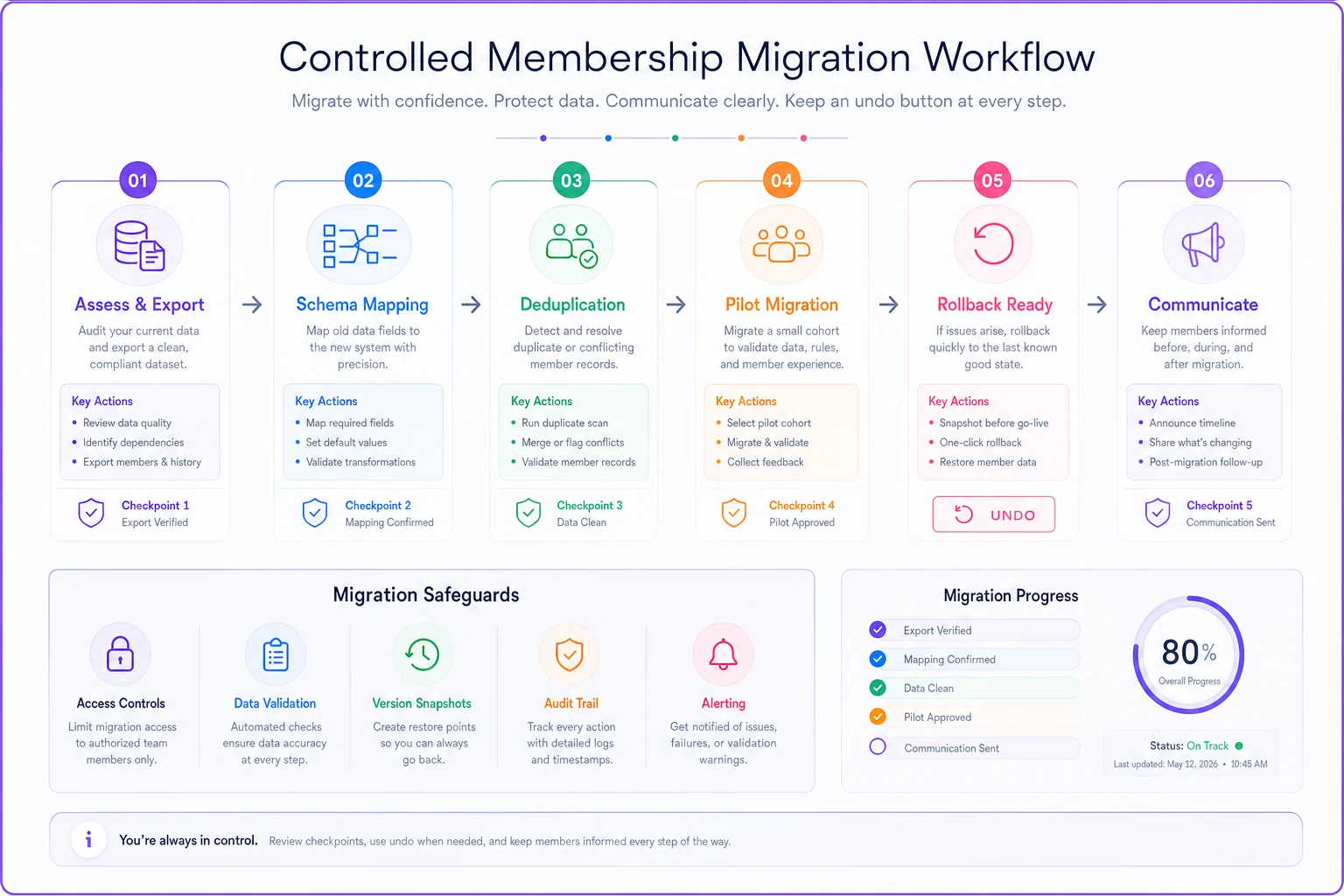
That fear is rational. But the disaster usually isn't the software — it's the migration approach. Clubs treat it like a single scary event ("we're switching Saturday") instead of a controlled process with checkpoints and an undo button. This playbook covers the boring, safe version: schema mapping, deduplication rules, a small pilot cohort, a real rollback plan, and member communications that don't cause a support pileup.
No IT department required. Just a plan and some discipline.
Why spreadsheet migrations go sideways
The messy part isn't moving rows. It's that a spreadsheet built up over years by five different volunteers has hidden logic baked into it that nobody documented.
A typical membership sheet looks fine until you actually read it. Column D is "Status" but someone's been using it for both membership tier and payment state. There are three date formats in the same column. "Membership Type" has 14 distinct values that really mean about 5 things — "Gold," "gold," "Gold Member," "GOLD (2022)," and so on. Two people share the same email because a spouse signed up under one address. Someone's renewal is tracked as a note in a merged cell.
When you dump that straight into a new system, the system does exactly what you told it to. It creates 14 tiers. It flags 40 members as duplicates and merges the wrong ones. It imports "N/A" as a real join date and now your tenure reports are garbage.
The failure is almost never technical. It's that nobody translated the spreadsheet's informal rules into explicit ones before the import. That translation step is the whole game.
Step 1: Map your schema before you touch the new system
Schema mapping sounds fancy. It just means: for every column in your spreadsheet, decide exactly where it goes in the new system, and what to do with the weird stuff.
Keep your membership organized and engaged.
Clubyly simplifies member management, event coordination, and payment collection—effortlessly.
- Unified member database
- Automated payment tracking
- Event scheduling & reminders
No credit card required
Do this in a separate tab or a simple doc. Not in your head, and definitely not live during import.
A practical mapping table looks like this:
| Spreadsheet column | New system field | Transformation rule | Problem values to fix first |
|---|---|---|---|
| First / Last (combined) | First name, Last name | Split on first space; manually fix 2-word last names | "Mary Jo Van Der Berg" style entries |
| Primary email | Lowercase, trim spaces | Blank, shared, obvious typos (gmial) | |
| Membership Type | Tier | Collapse 14 values → 5 canonical tiers | Anything with a year in it |
| Status | Two fields: Tier + Payment status | Separate the two meanings manually | Rows using it for both |
| Join Date | Member since | Force ISO date; blanks flagged for review | "N/A", "old member", "~2015" |
| Notes | Internal note | Import as-is, review after | Payment info hiding in notes |
The single biggest win here is spotting fields that are doing two jobs. That "Status" column carrying both tier and payment state is the classic one. Split it before import, not after, because untangling merged meaning inside a real database is far more annoying than fixing it in a flat sheet.
One rule that saves a lot of grief: any value you can't confidently map goes into a "REVIEW" bucket, not a guess. A guessed join date is worse than a blank one because it silently corrupts every tenure and lifecycle report you'll build later. If you've already thought through a [canonical schema and retention rules](), this is where that groundwork pays off — you already know your target shape.
Step 2: Write dedup rules before you dedupe
Duplicates are where good migrations quietly go bad. The instinct is to let the new system "auto-merge duplicates." Don't, at least not blindly. Auto-merge picks a winner and discards the loser's data, and you often can't tell what got thrown away.
Define your matching logic in plain language first:
-
Exact match on email → almost certainly the same person, safe to merge.
-
Same last name + same phone, different email → likely same person or spouse, flag for human review.
-
Same first + last name, no shared contact info → probably different people, do NOT merge (there are two John Smiths).
-
Shared email between two clearly different names → a household situation, split into separate records with a shared household tag if your system supports it.
Clubs assume email is a unique identifier. In real membership data it isn't. Spouses, family plans, and old work emails reused by new members break that assumption constantly. A club of around 600 members will often have 30–50 shared or duplicated emails, and roughly a third of those are genuinely two different people.
Export the flagged list to CSV first so the reviewer can sort, filter, and make consistent merge decisions quickly.
Run dedup in two passes. First pass: auto-merge only the exact-email matches you fully trust. Second pass: export the flagged list and have one person eyeball it. Boring work, but it's an hour or two, not a week — and it prevents the nightmare of merging two unrelated members into one Frankenstein record.
Step 3: Pilot with a small cohort, not the whole club
Don't migrate everyone at once. Pick a pilot cohort of 30–60 members and run the entire process on just them.
Choose the cohort deliberately. You want a representative slice, not just the easy records:
-
A handful of clean, straightforward members (baseline sanity check).
-
A few known messy records — the shared emails, the "REVIEW" join dates, the weird tiers.
-
At least one board member or committee chair — someone who'll actually log in and complain loudly if something's off.
-
A couple of recently joined and a couple of long-tenured members, so you test the full lifecycle range.
Import that cohort. Then live with it for a week or two. Log in as those members if the new system has a portal. Send a test renewal reminder. Pull a small report and check the numbers against your spreadsheet. Ask the board member to find their own record and confirm it looks right.
The point of the pilot isn't to prove the software works. It's to surface the transformation rules you got wrong while the blast radius is 40 people instead of 600. You'll almost always find at least one mapping mistake. Better to find it now.
A quick visual can help stakeholders see the checkpoints and rollback options.
When a pilot is overkill
If your club is under ~50 members total and the spreadsheet is genuinely clean — one row per person, consistent formats, no shared emails — a formal pilot is probably more ceremony than you need. In that case, run the full import but keep the rollback plan (next section) fully intact. At tiny scale, the rollback matters more than the pilot.
Step 4: Have a rollback plan that actually works
A rollback plan isn't "we'll figure it out if something breaks." It's a written, tested answer to: if this migration is clearly wrong, how do we get back to a working state within an hour?
Before you migrate anything:
-
Make a frozen master copy of the spreadsheet, dated, read-only, stored somewhere nobody edits. This is your source of truth and your fallback.
-
Note the exact time you're cutting over. Any changes after that point — new signups, payments — get logged separately in a "changes since freeze" sheet.
-
Confirm the new system lets you fully delete or reset an import batch. Many do. If yours doesn't, do the pilot import into a sandbox or test environment first.
-
Your rollback trigger should be a clear line, decided in advance — something like: "If more than 10% of member records have a wrong tier or missing payment status after import, we roll back and re-map." Without a predefined trigger, people argue in the moment and the broken data lingers for weeks.
The most common rollback failure isn't the software — it's that someone kept using the old spreadsheet and the new system during the transition. Now both are half-right and you can't cleanly revert to either. Pick one live system at a time. During the pilot, the spreadsheet stays the official record. Only after full cutover does the new platform become authoritative.
Step 5: Communicate with members so support doesn't melt down
Members don't care about your schema. They care about two things: does my login still work and is my membership and payment still correct. A migration that's technically flawless can still feel like a disaster if members get surprised.
A simple communication timeline that works:
-
~1 week before cutover short note. "We're upgrading our membership system. Nothing you need to do yet. Around [date] you'll get a link to set up your new login." Set the expectation early.
-
Cutover day the actual login and setup instructions, kept to one screen. One clear button, one clear action. Assume half your members skim.
-
~2 days after a gentle nudge to anyone who hasn't logged in, plus a single point of contact for problems ("reply here or email X"). Don't scatter support across five channels.
-
~1 week after a "you're all set" confirmation and a note about any new self-service features, so the change feels like a benefit rather than just a hassle.
Keep the volume low and the instructions simple. The clubs that get flooded with confused emails are almost always the ones that sent one long, feature-heavy announcement instead of a short "here's the one thing to do" message.
A real scenario
A regional hobbyist club — around 480 active members — had run everything from a single shared spreadsheet for years. Renewals were tracked by hand, and every summer roughly $2k–$3k in dues slipped through because someone forgot to follow up on lapsed members. The sheet had about 40 duplicate or shared-email records nobody had cleaned up.
They mapped the schema first and found the classic problem: the "Type" column mixed tier and status, and about 60 join dates were blank or written as "old member." They ran a pilot on 45 members, including their treasurer and a few of the messiest records. The pilot caught two real errors — a tier collapse that had merged their two lowest tiers by mistake, and a date rule that turned blank join dates into today's date.
Because they caught it in the pilot, the full migration a week later was uneventful. They froze the old sheet, cut over on a Tuesday, and sent a three-message sequence to members. Support volume was a handful of login questions, not a flood. A couple months in, the treasurer estimated they were recovering most of that previously-lost renewal revenue simply because lapsing members now triggered an automatic reminder instead of relying on someone to notice.
Nothing dramatic happened. That was the point.
Where automation quietly helps (and where it doesn't)
Once you're off spreadsheets, the real payoff isn't the storage — it's that the operational grunt work stops depending on a volunteer remembering to do it. Renewal reminders, lapsed-member follow-ups, and failed-payment nudges can run on rules instead of memory. That's where AI-assisted membership platforms earn their keep: not by doing anything flashy, but by handling repetitive follow-ups and flagging odd records — a member with a payment but no active tier, say — before they become a mess again.
But automation won't fix a bad migration. If you import garbage, you'll get automated garbage — wrong reminders to the wrong people, faster. The mapping and dedup work above is what makes any later automation trustworthy. Clean data first, rules second.
When to hold off entirely
Migrating isn't always the right call this quarter. Hold off if:
-
You're mid-renewal-season. Migrate in your quiet period, not while dues are actively flowing in.
-
Nobody owns the project. If there's no single person accountable for the mapping and pilot, it will stall halfway and leave you with two half-systems.
-
Your spreadsheet is genuinely tiny, stable, and nobody's in pain. There's no prize for switching software you don't need.
For everyone else — the clubs where the spreadsheet has quietly become a liability, where renewals slip and nobody fully trusts the numbers — the move is worth it. Just do it the slow-and-safe way: map first, dedup with rules you wrote down, pilot small, keep a frozen fallback, and tell members exactly the one thing they need to do.
The clubs that get burned aren't the ones that migrate. They're the ones that migrate all at once, with no map, no undo, and a mass email that generates a hundred confused replies. Do the boring version instead. Boring is what keeps 480 members from noticing anything changed at all.
Ready to streamline your club operations?
Join 500+ clubs using Clubyly to save time, boost member engagement, and grow their communities.