



Most member directories fail in one of two directions. Either they're so locked down that nobody uses them — a login wall, a search box that returns three results, no way to find the person you met at last month's mixer — or they're so open that a member emails the board asking why their home address showed up in a Google search.
Both failures come from the same root cause: nobody sat down and made explicit decisions about which fields go public, which stay private, and who gets to verify that a listing is real. The directory just... happened. Someone imported the membership spreadsheet, flipped it into a listing view, and hoped for the best.
This post is the decision matrix I wish more clubs had before they turned their directory on. We'll go field by field, set sane opt-in defaults, walk through verification, and end with the search and moderation UX that actually makes the thing usable. No theory — just the choices you have to make and how to make them.
Start with the field-by-field decision, not the platform
The mistake almost everyone makes is choosing a directory tool first and then figuring out what to expose. Do it backwards. Decide the exposure rules, then pick something that can enforce them.
The core question for every single field: what does a member gain by having this visible, and what do they lose? Most fields fail that test the moment you look at them honestly. A member gains almost nothing from having their phone number public, but they lose a lot if it ends up scraped.
Below is the matrix we generally start from. It's not gospel — a professional networking club will lean more open than a parents' cooperative — but it's a defensible baseline.
| Field | Default visibility | Opt-in to go public? | Notes |
|---|---|---|---|
| Display name | Members-only | No (required) | First name + last initial as fallback option |
| Photo | Members-only | Yes | Let members upload or skip; no auto-import from payment profile |
| Professional/role | Members-only | Yes | Useful for networking clubs, irrelevant for hobby clubs |
| Hidden | Yes, but routed | Use a contact-form relay, never expose the raw address | |
| Phone | Hidden | Rarely | Only for committee chairs or emergency roles |
| Home address | Hidden | Never | No legitimate directory reason for this to be visible |
| City / region | Members-only | Yes | Good middle ground for "who's near me" without exposing addresses |
| Join date / tenure | Members-only | Optional | Some clubs love showing "member since 2019" |
| Committees / interests | Members-only | Yes | This is what makes a directory searchable and useful |
| Payment / dues status | Hidden | Never | Should never touch the directory layer at all |
The single most important line in that table is the last one. Dues status, payment history, and any financial field must live entirely separate from your directory. We've seen clubs where a "days overdue" column was one accidental permission toggle away from being visible to the whole membership. That's not a privacy inconvenience — that's a resignation letter waiting to happen. If you're still figuring out where these fields even live, the groundwork in membership data strategy for small clubs covers how to keep financial and directory data in separate lanes from the start.
Opt-in defaults: the setting that quietly decides everything
There's a rule in privacy design that clubs consistently get wrong: the default is the decision. Whatever you set as the default is what the majority of members will keep, because most people never touch settings at all.
Keep your membership organized and engaged.
Clubyly simplifies member management, event coordination, and payment collection—effortlessly.
- Unified member database
- Automated payment tracking
- Event scheduling & reminders
No credit card required
So if your directory defaults every field to public and tells members "you can opt out anytime," you've effectively made the whole membership public. The few people who read the welcome email carefully will adjust their settings. Everyone else is now exposed by inertia, and they never actually chose it.
The correct default is members-only visibility with explicit opt-in for anything more public. That means:
-
New members land in a members-only directory automatically
-
Nothing is visible to the outside internet unless they flip a switch
-
The switch is presented once during onboarding and again on their profile page, in plain language
One club I looked at had around 400 members and switched from opt-out to opt-in defaults. Under the old opt-out system, the assumption was that everyone was fine being listed. After moving to opt-in, only about 240 members actively chose to appear even in the members-only view, and far fewer chose any public exposure. That gap — 400 assumed vs 240 actually wanting it — is the number that should concern you. Opt-out doesn't measure consent. It measures who didn't notice.
When more open makes sense
-
Professional and networking associations, where the whole point of membership is being findable by peers
-
Trade or referral groups, where members expect to generate business from being listed
-
Alumni networks, where reconnection is a core benefit
Even here, "more open" means the professional fields go public more readily — role, expertise, city — while personal contact details stay behind a relay. Open the fields that serve the mission, not the fields that just happen to be in your database.
When a public directory is a bad idea
If your membership includes minors, survivors, patients, or anyone with a safety-sensitive reason to stay private, a public-facing directory is the wrong tool entirely. Same goes for support-oriented groups and recovery communities. In those cases the directory should be members-only at the strictest setting, and honestly you might question whether you need a searchable directory at all versus a simple committee contact list.
Verification: the step everyone skips and regrets
Here's a scenario that plays out more than you'd think. A club opens its members-only directory. A few weeks later, a member reports that someone messaged them through the directory pretending to be a board member, asking about payment. The "board member" was a lapsed member whose account was never deactivated, or worse, someone who signed up with a fake profile during an open enrollment window.
A directory is a trust surface. The moment members can contact each other through it, you're implicitly telling everyone "these are real, vetted people." If that's not actually true, you've created a phishing channel with your logo on it.
Verification doesn't need to be heavy. A workable process looks like this:
-
Confirm email at signup — the basic bar, but skip it and you'll get typo'd and fake addresses in the directory forever.
-
Tie directory visibility to active membership status — if dues lapse or the account is deactivated, the listing disappears automatically. Nobody should have to remember to manually pull expired members.
-
Require one admin-verified field for public listings — for anyone opting into public visibility, have a human confirm the professional claim or role. This is what stops "CEO of [made-up company]" listings.
-
Add a "verified member" badge only after confirmation — and be strict about it. A badge that everyone gets means nothing. A badge that signals real verification is what makes contact through the directory safe.
-
Re-verify on a cadence — at renewal, prompt members to confirm their listing is still accurate. Directories rot faster than people expect.
This flow ties verification, visibility, and renewal together so listings don't become stale or deceptive.
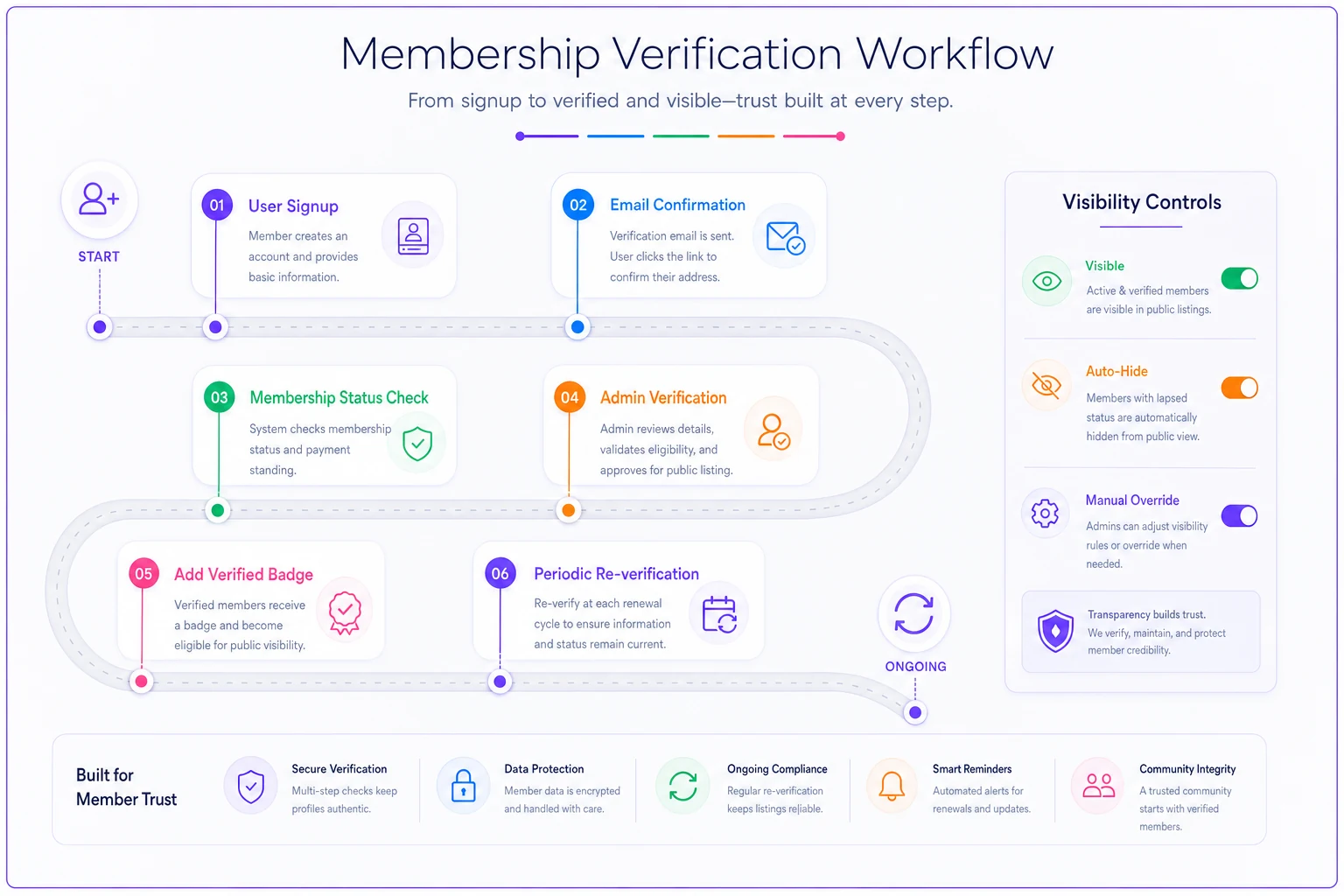
The link between membership status and directory visibility is the one that saves you the most grief. When those two things drift apart, you get ghost listings — people who left two years ago still showing up, still technically contactable. Auto-syncing status to visibility means the directory largely cleans itself.
Search and moderation UX for small teams
This is where useful and useless directories split. You can get every privacy decision right and still ship a directory nobody touches because searching it is miserable.
Make search match how people actually look for members
People don't remember exact names. They remember "the woman who does landscaping near the north branch" or "the guy on the events committee." Your search needs to handle:
-
Partial name matching — typing "Kath" should find Katherine, Kathy, and Kathleen
-
Interest and committee filters — the single most-used feature in networking directories
-
Location filtering by city or region, never by address
-
Role and expertise search for professional groups
If your search only does exact-name lookup, members will use it once, fail to find who they're looking for, and never come back. What comes up repeatedly when clubs audit their directory usage is that the interest/committee filter is what turns a static list into something people actually browse. Get that right before anything else.
Moderation without a full-time moderator
Small clubs don't have someone whose job is watching the directory. So the moderation workflow has to be lightweight and mostly reactive:
-
A visible "report this listing" link on every profile
-
A single inbox or queue where reports land, owned by one named person (not "the board" — a specific human)
-
A clear rule set posted somewhere
no soliciting, no misrepresentation, no scraping
-
The ability to instantly hide a listing pending review, so you can act first and investigate second
The named-owner point matters more than the tooling. Directories with "someone will handle it" moderation get nothing handled. Assign it to one person, give them the ability to hide a listing in two clicks, and you've covered the vast majority of what a small club will ever face.
Assign a single named moderator and equip them with a one-click hide action to keep the workflow fast.
A quick note on collecting the preferences
Getting members to actually set their visibility preferences — rather than ignoring the settings page entirely — is its own small project. Framing the choice as a single clear question during onboarding works far better than a settings panel full of toggles. If you want to gather real input on what members want visible before you design the whole thing, the approach in the membership survey program works well for surfacing directory preferences without building a massive survey.
A real scenario
A regional hobbyist club — around 320 members, run by three volunteers — had an old directory that was basically a PDF emailed once a year. It included full names, phone numbers, and home addresses, because that's what the founding members had always shared. Newer members hated it. Two people quit citing the address exposure, and several younger members simply refused to be listed at all, which made the directory feel half-empty and pointless.
They rebuilt it around opt-in defaults. New default: members-only, name and city visible, everything else opt-in. Contact happened through a relay form, so no email or phone was ever exposed. Addresses were dropped from the directory entirely.
The results weren't dramatic in a headline way, but they were the right kind of change. Directory participation went from roughly 60% — under the old "you're listed unless you complain" model, where plenty of people did complain — to close to 85% actively choosing to appear once they had control over what showed. The interest filter got used far more than the old PDF ever did; members started finding each other for carpools and project help. And the board stopped fielding privacy complaints entirely, which for a three-person volunteer team was honestly the real win.
The lesson wasn't "hide everything." It was that people participate more when they trust the boundaries. Give members control over their exposure and more of them opt in, not fewer.
Your implementation checklist
Run through this before you turn any directory on or migrate an existing one:
-
Every field classified as hidden / members-only / public-optional
-
Financial and dues data confirmed to live outside the directory entirely
-
Home addresses removed from directory data completely
-
Default set to members-only, public exposure requires explicit opt-in
-
Opt-in presented clearly at onboarding, not buried in settings
-
Email and phone routed through a contact relay, never exposed raw
-
Directory visibility auto-synced to active membership status
-
Verification step defined for anyone opting into public listings
-
"Verified member" badge tied to a real confirmation step
-
Search supports partial name, interest/committee, and city filters
-
"Report listing" link on every profile
-
One named person owns the moderation queue
-
Instant-hide capability for flagged listings
-
Re-verification prompt scheduled at renewal
Your implementation checklist
Bringing it together
A good member directory isn't about how much you can show. It's about matching exposure to actual consent, keeping financial data far away from the listing layer, and making sure the people in the directory are who they claim to be. Get the defaults right and most of the privacy risk disappears on its own — members are only ever as exposed as they chose to be.
The clubs that get this wrong usually did the easy thing first — dumped the spreadsheet into a listing view — and dealt with the fallout later. The clubs that get it right spent an afternoon on the field-by-field decisions before anything went live. That afternoon is cheaper than a single member resignation over an exposed address, and it's the difference between a directory people actually use and one they quietly avoid.
A good member directory isn't about how much you can show. It's about matching exposure to actual consent, keeping financial data far away from the listing layer, and making sure the people in the directory are who they claim to be. Get the defaults right and most of the privacy risk disappears on its own — members are only ever as exposed as they chose to be.
Ready to streamline your club operations?
Join 500+ clubs using Clubyly to save time, boost member engagement, and grow their communities.