

Remote attendees aren't leaving because the content is bad. They're leaving because they've spent 40 minutes staring at the back of someone's head, listening to a room laugh at a joke they couldn't hear, waiting for a chance to say something that never comes. Nobody looked at the chat. Nobody read their question. So they open another tab, and eventually they close yours.
That's the actual failure mode of most recurring hybrid meetups. Not the AV — the AV is just a symptom. The real problem is that in-room energy and online energy run on two completely separate tracks, and unless someone is deliberately stitching them together, the online track dies quietly every single time.
And it's fixable without spending real money. What kills hybrid meetup engagement isn't the absence of a $2,000 conference camera — it's the absence of a person whose entire job is watching the remote room, plus a couple of scripts and a role checklist that make sure that job doesn't get forgotten the moment the meeting gets busy.
The moment it falls apart (and it's always the same moment)
Watch any club that runs a monthly hybrid meetup and you'll see the collapse happen at a predictable point: the transition from structured agenda into open discussion.
During the structured part, remote people are fine. There's a speaker, there's a shared screen, everyone's oriented. Then the host says "okay, let's open it up" — and the in-room people start talking to each other. Side conversations. Someone stands up. Chairs scrape. The single laptop mic on the table now picks up a wash of overlapping voices, and the remote attendees hear mush.
Meanwhile three people typed questions into the chat. Nobody's watching the chat, because the person who was watching it just got pulled into the in-room conversation.
The remote room is now invisible and inaudible. Within ten minutes, half of them are gone. The host never notices because the Zoom tile count doesn't shift much — cameras stay on even after people have mentally checked out. You find out three weeks later when those same people don't RSVP again.
The pattern is consistent enough that you can basically set a timer to it. Structured segment: remote engagement holds. Unstructured segment: remote engagement falls off a cliff unless something specific prevents it.
The cheapest fix isn't hardware — it's a named role
Most clubs try to solve this with gear. They buy a better camera, an omnidirectional mic, sometimes a whole Meeting Owl-style device. Those help a little. But you can spend $600 on hardware and still lose every remote attendee, because hardware doesn't watch the chat and hardware doesn't interrupt the in-room crowd to say "hey, Marcus online has a question."
Keep your membership organized and engaged.
Clubyly simplifies member management, event coordination, and payment collection—effortlessly.
- Unified member database
- Automated payment tracking
- Event scheduling & reminders
No credit card required
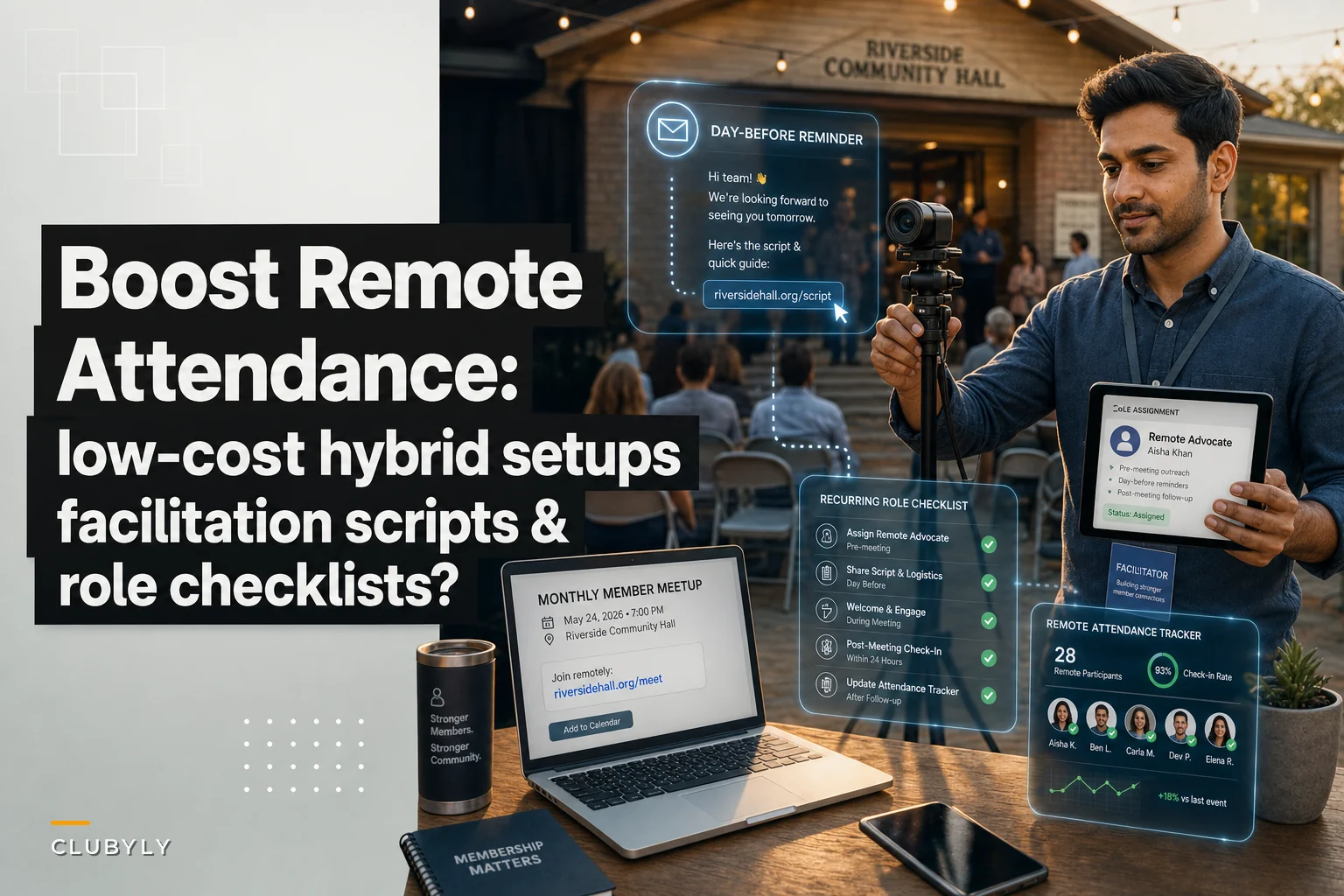
The single highest-leverage change is assigning one person to be the Remote Advocate for the meeting. Not the host. Not the presenter. A separate human whose only job is to represent the people who aren't in the room.
This role sounds trivial. It is not. In practice it's the difference between a hybrid meetup that grows its online membership and one that slowly becomes in-person-only by attrition.
Here's what falls apart when nobody owns this:
| Function | Who thinks they own it | Who actually owns it | What happens when unowned |
|---|---|---|---|
| Watching chat | "The host" | Nobody, once host is busy | Questions ignored for 20+ min |
| Reading remote questions aloud | "Whoever sees it" | Nobody | Remote voices never heard |
| Managing mic mute/unmute | "IT person" | Usually nobody | Room audio turns to mush |
| Noticing remote drop-off | Nobody | Nobody | Discovered weeks later via RSVPs |
| Prompting remote people by name | Host | Nobody | Remote folks stay silent, then leave |
Every row in that "unowned" column is a reason someone doesn't come back.
A hardware setup that costs almost nothing and actually works
You don't need a production budget. You need to solve two specific problems: the room needs to hear the remote people clearly, and the remote people need to hear the room during discussion — which is the genuinely hard part.
A setup that works for a room of 15–40 people for well under $150, assuming you already own a laptop:
-
One laptop as the "meeting host" machine, placed at the front, running your video call. Camera points at the speaker or presentation area.
-
A cheap USB conference mic ($40–70 range) placed in the center of the room, not next to the laptop. This is the single most important purchase. A center mic captures in-room discussion far better than a laptop mic buried at the front table.
-
A second device — a phone or tablet — logged into the same call on mute, camera on, positioned to show the audience rather than the speaker. Remote people want to see reactions, not just slides. This one change makes a noticeable difference in how present online attendees feel.
-
A small Bluetooth speaker ($25–40) so the room actually hears remote voices at a normal conversational volume, not through a tinny laptop speaker nobody can hear over scraping chairs.
-
Headphones for the Remote Advocate so they can monitor remote audio quality without creating echo, and actually catch when the remote room can't hear something.
Total spend: roughly $100–140. Most of the value comes from two decisions — putting the mic in the center, and giving remote people a second camera angle on the audience. Clubs skip both of those constantly and then blame Zoom.
Spend on audio capture and a second angle, not on a fancy single camera. Remote attendees forgive a slightly grainy picture. They will not forgive not being able to follow the discussion.
The three role checklists
The Remote Advocate can't hold everything in their head while the meeting runs. Neither can the host. Print these or keep them open on-screen. They take two minutes to read and prevent the exact failures above.
Host checklist (the person running the agenda):
-
Open by greeting the room and the remote attendees by name where possible
-
Before open discussion, say
"Remote folks, drop questions in chat — [Advocate] is watching and will bring you in"
-
Pause every ~10 minutes during discussion and ask the Advocate
"Anything from online?"
-
Repeat in-room questions into the mic before answering (remote couldn't hear the person who asked)
-
Don't let the room go fully unstructured for more than a few minutes without a remote check-in
Remote Advocate checklist:
-
Join the call 10 min early, test that the center mic is being heard remotely
-
Post a welcome message in chat; ask remote folks to react so you know who's live
-
Watch chat continuously — this is your only job, don't get pulled into room talk
-
When a remote person has a question, physically flag the host ("hold on — question from online")
-
Read remote questions aloud yourself if the host is mid-flow
-
Note in chat when the room goes off-topic so remote people aren't confused by silence
-
Track roughly how many remote people are actually engaging vs. just sitting idle
Tech setup person (can be the same as the Advocate for small groups):
-
Center mic placed and tested
-
Audience-angle device joined on mute, camera on
-
Room speaker on and at a volume that beats ambient noise
-
Backup
phone hotspot ready in case room wifi drops mid-meeting
If you only implement one of these, make it the Advocate checklist. The rest amplifies it, but the Advocate is the fix.
Remote facilitation scripts you can hand to a volunteer
The reason to script this is that the Advocate role usually rotates between volunteers, and a nervous first-timer freezes at exactly the moment they need to interrupt. A script removes the social risk of cutting into a room full of talking people.
Opening (Advocate, in chat, before start):
> "Welcome! I'm [name] and I'm your point of contact online today. Drop any question or comment in chat anytime and I'll make sure it gets to the room — you don't have to unmute and fight for airtime. React with 👋 so I know you're here."
Bringing a remote question into the room (Advocate, out loud):
> "Sorry to jump in — [Name] online is asking [question]. Can we take that one?"
That "sorry to jump in" phrasing matters more than it looks. It gives permission to interrupt, which is the entire barrier. Volunteers who won't interrupt a room will say "sorry to jump in."
When the room drifts and remote people go quiet (Advocate, in chat):
> "Heads up online — the room's on a side tangent about [topic]. I'll flag when we're back on the agenda. Anything you want me to raise in the meantime?"
Handing off / closing (Host, out loud):
> "Before we wrap — [Advocate], anything from online we didn't get to?"
That final line is a safety net. It catches every question that slipped through and, more importantly, it signals to remote attendees that they were never forgotten. That's what brings them back next month.
A real scenario
A regional professional networking club, roughly 90 active members, ran monthly hybrid meetups. In-person turnout was healthy — 25 to 35 people a night. Remote was the problem. They'd get around 18–20 online RSVPs but by the halfway point maybe 5 were still actually engaged, and remote members were renewing at a noticeably lower rate than in-person ones.
They changed almost nothing about the format. They bought a $55 center mic and a cheap speaker, added a second phone angle on the audience, and — the real change — rotated a named Remote Advocate each month using the scripts above. No new software, no meaningful new budget.
Within three or four meetups, mid-meeting remote engagement went from around 5 people to somewhere in the 13–15 range, and it stayed there. Remote members started posting in chat unprompted because they'd learned someone was actually reading it. The renewal gap between remote and in-person members narrowed over the following couple of quarters. The whole intervention cost under $100 and one volunteer role per meeting.
The lesson wasn't "buy gear." It was "someone has to be responsible for the people who aren't in the room."
When this setup makes sense — and when it doesn't
This works well when:
-
You run a recurring meetup (the role rotation and muscle memory compound over time)
-
Your remote group is 5–25 people — big enough to matter, small enough for one Advocate to manage
-
Discussion and interaction are the point, not just watching a presentation
This is overkill when:
-
Your meetup is pure broadcast — one speaker, no discussion. Then you don't need an Advocate, you need a decent stream and that's it.
-
Remote attendance is 2–3 people who all already know everyone. They'll self-advocate.
Who should NOT bother with the second camera angle: If your room is under 8 people, the audience angle adds clutter. Just get the center mic and the Advocate right. Add complexity only when the group size actually justifies it.
Making the role stick past the first month
The predictable failure after all this is that the Remote Advocate role gets skipped one busy month, then the next, and within a quarter you're back to invisible online attendees. Recurring meetups live and die on whether roles actually get filled, not on whether they exist on paper.
Treat the Advocate like any other meetup role that needs a name attached before the day arrives — the same discipline you'd apply to any volunteer scheduling and reminder system so the slot never shows up empty. And if your meetup involves any onsite complexity beyond a few dozen people, fold remote facilitation into your broader run-of-show the way you'd handle an event safety and onsite roles runbook — assigned, checklisted, and not left to whoever happens to be free.
Here's a quick workflow to keep the Advocate role filled:
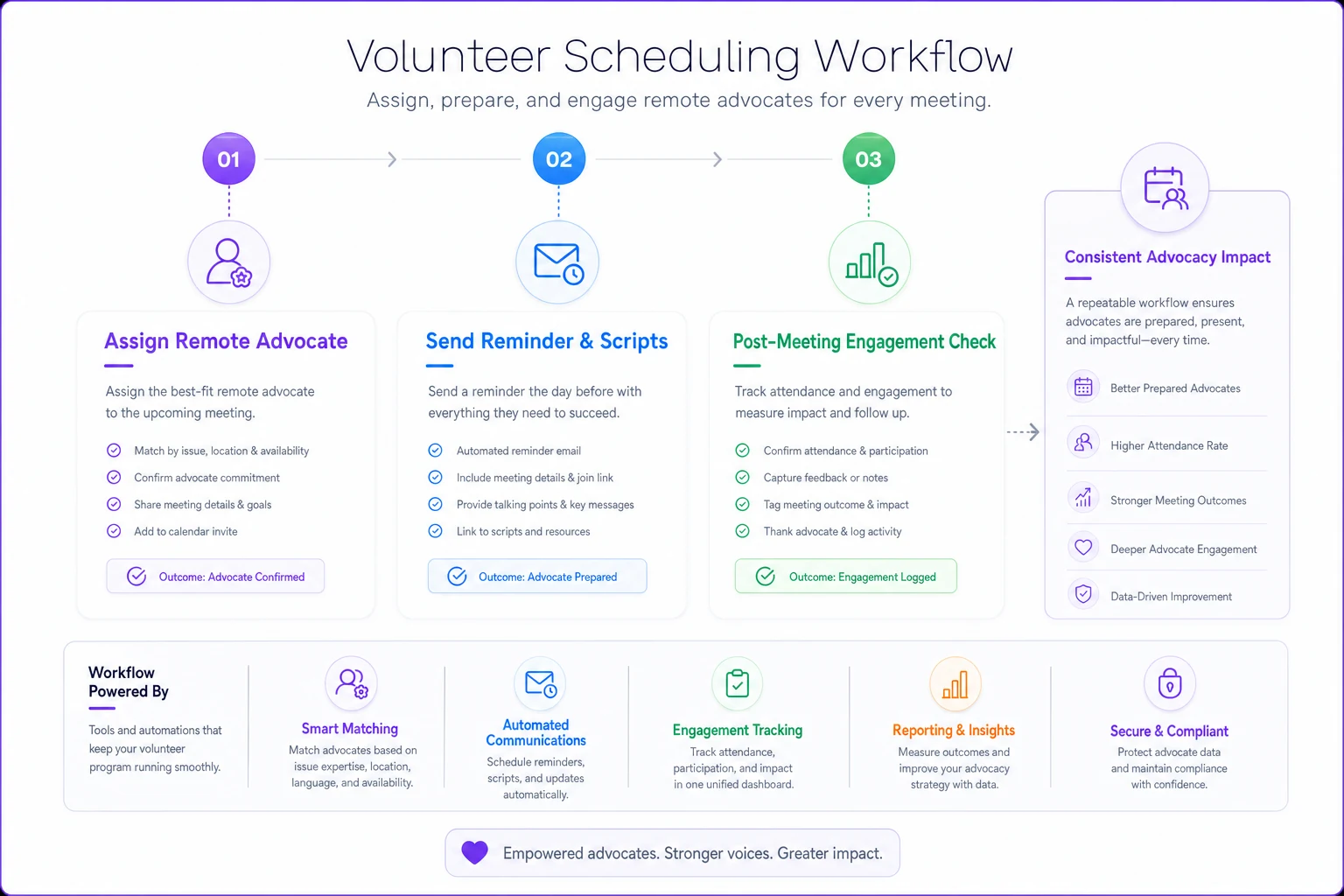
The tools that help here aren't fancy. A shared calendar that assigns the Advocate role a week ahead, a reminder that nudges the assigned volunteer the day before with a link to the scripts, and a simple post-meetup note tracking how many remote people stayed engaged — that's enough to keep the whole thing from decaying. Whether you run that in a spreadsheet or a proper club management system matters less than actually running it.
The one thing to take away
Hybrid meetup engagement is not a hardware problem and it's not a content problem. It's a responsibility problem. The remote room disappears the moment nobody is specifically watching it, and it comes back the moment one person is.
Buy the center mic. Add the audience angle. But above all, name the Remote Advocate before the meeting starts, hand them the scripts, and let the host lean on them out loud. Do that consistently for three or four meetups and the online drop-off you've been quietly living with just stops being your problem.
Ready to streamline your club operations?
Join 500+ clubs using Clubyly to save time, boost member engagement, and grow their communities.